

Audience penetration on LinkedIn measures how much of your target account list you actually reach.
In an account-based context, it’s not just about raw impressions.
It’s about reaching the right companies and multiple stakeholders within them.
To truly deepen penetration, you need to combine LinkedIn ads with organic tactics and align sales and marketing.
In the following playbook (with proven ABM tips), I’ll show how to target named accounts, roles, and ICP segments for maximal reach, both through targeted LinkedIn campaigns and coordinated content strategy.
I’ll also show how ZenABM can help you along the way.

In case you want it short:
First, clarify what “audience penetration” means for your LinkedIn program.
Typically, it’s the percentage of your target audience (accounts or individuals) that your campaign reaches.
If you’re going for an ABM approach (the one I have primarily discussed in this article), audience penetration is about accounts reached per total accounts in your target list.
For example, if you target 10 key accounts and your LinkedIn ads reach 3 of them, that’s 30% account-based LinkedIn audience penetration.
A high penetration rate (alongside healthy frequency) usually means you’ve effectively exposed most of your target accounts to the campaign.
If penetration is low, common culprits are an audience list that’s too broad or a budget that’s too small.
LinkedIn often recommends 50K+ audience size for broad campaigns, but in ABM, you typically target far fewer – so budgets and bidding strategies must be tweaked.
Let’s look at how to increase LinkedIn audience penetration with an account-based approach using both paid and organic channels.
Before any outreach, work with sales to finalize your ICP and target accounts.
Then, within each account, identify the buying committee roles:
For instance, in a tech sale, target both the CTO (IT role) and the CFO (finance role) with tailored messages.
This “land-and-expand” inside accounts boosts internal penetration.
The better your role map, the more precise your LinkedIn segments can be (job seniority filters, skill or group targeting).
Note: Don’t oversegment based on persona, seniority and other filters. Every LinkedIn ad campaign must have at least 300 targets to go live.
Once your accounts and roles are set, segment campaigns by account tier and persona.
Use LinkedIn’s Matched Audiences to upload your account list or use Company Targeting filters.

Break down your list into smaller segments (by account size or ICP fit) and create separate ad campaigns for each persona cluster.
For example, run one campaign targeting “CFOs in our TAL” and another for “IT Managers in our TAL”.
This avoids delivering irrelevant creative to mismatched roles and keeps audiences tight.
Within each campaign, develop multiple ad variations focused on the most pressing pain points for that role.
The more granular your targeting (e.g. by seniority + function), the higher your relevance and reach within that slice.
However, keep individual audiences modest (a few thousand at most) to allow saturation.
If one campaign targets a small list (<5K), consider using the Audience Expansion feature sparingly, but mainly rely on your named list to maximize penetration.
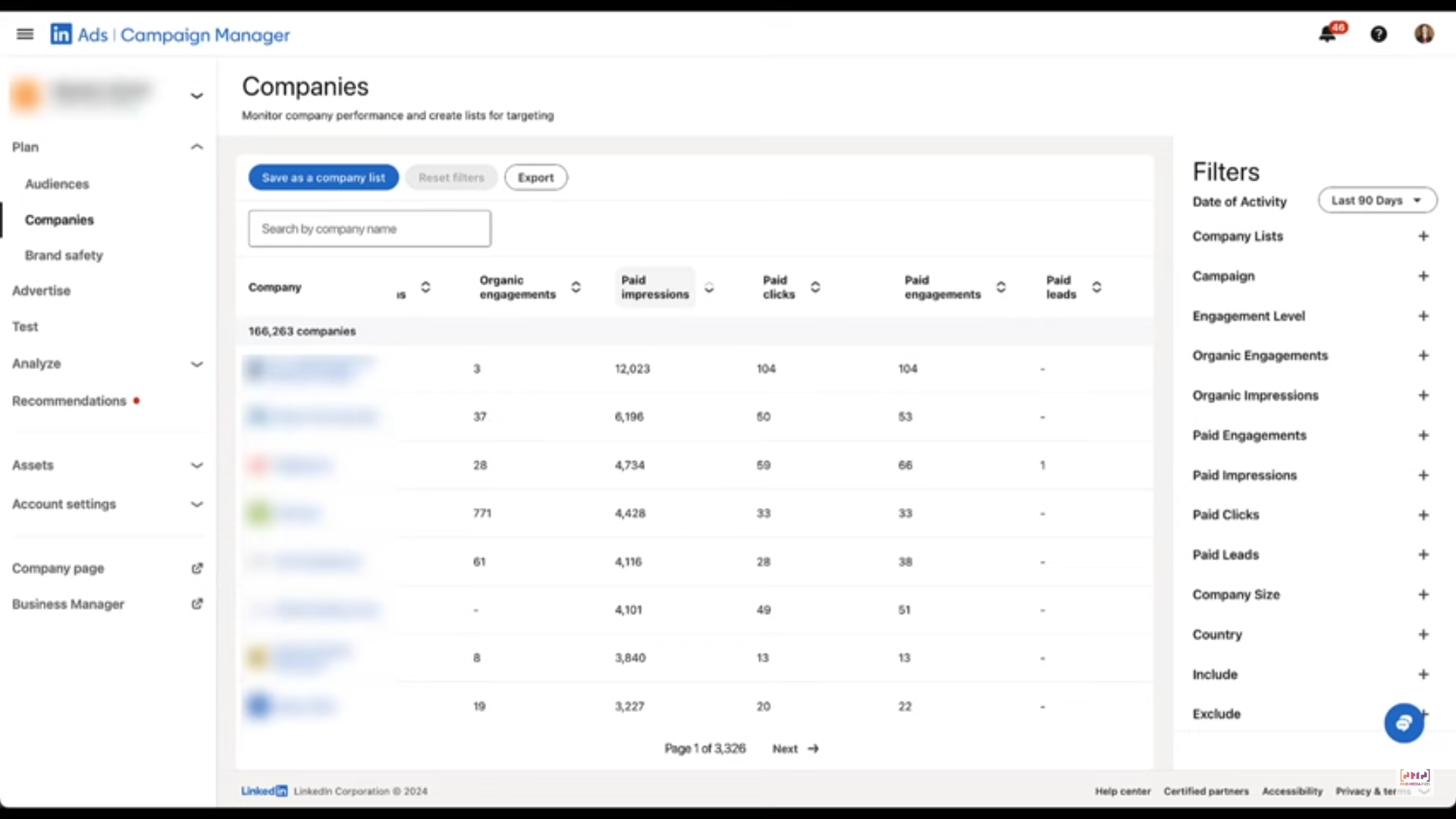
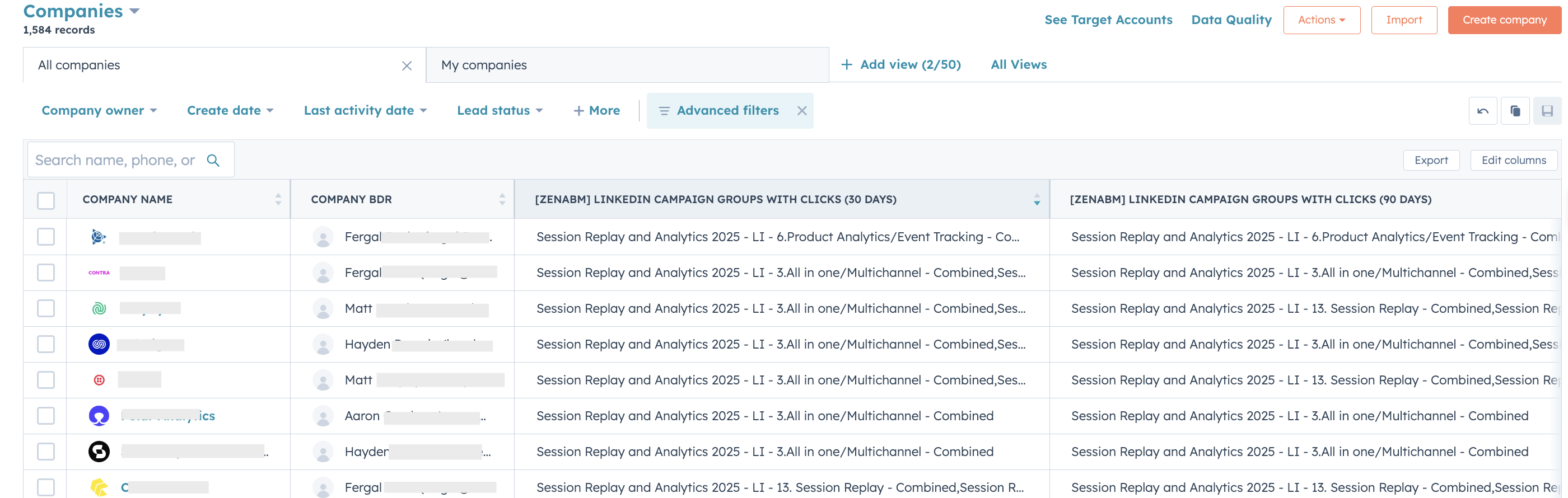
By the way, as we are talking about audience penetration with an ABM perspective, you’ll need to see which accounts are engaging with your ad campaigns.
While you can see that in LinkedIn campaign manager’s companies tab, the view there ain’t campaign level.
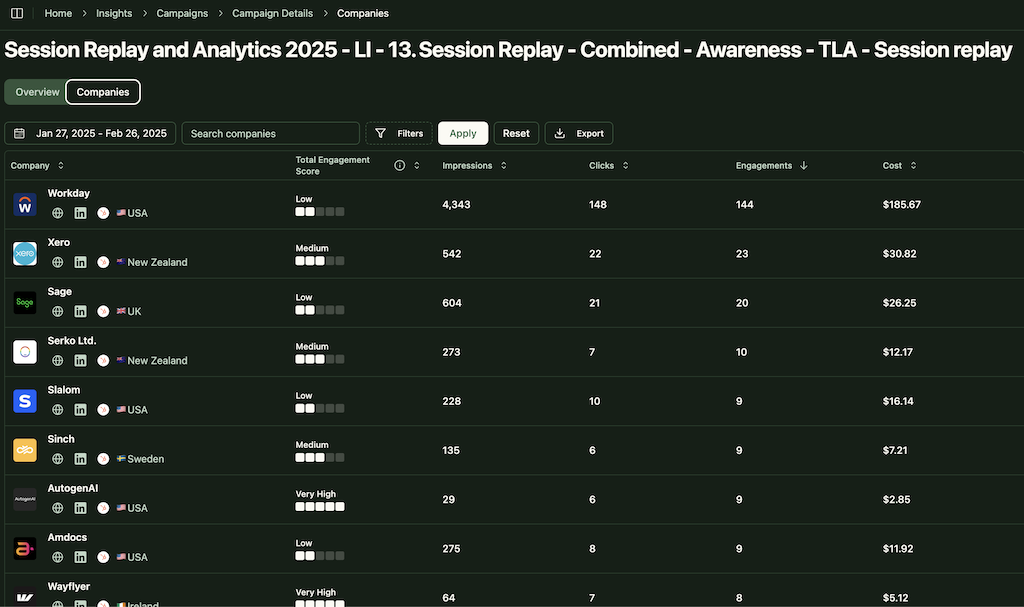
You can see all the companies engaging with your brand, but not exactly which ad campaign they are engaging with:
ZenABM can help here.
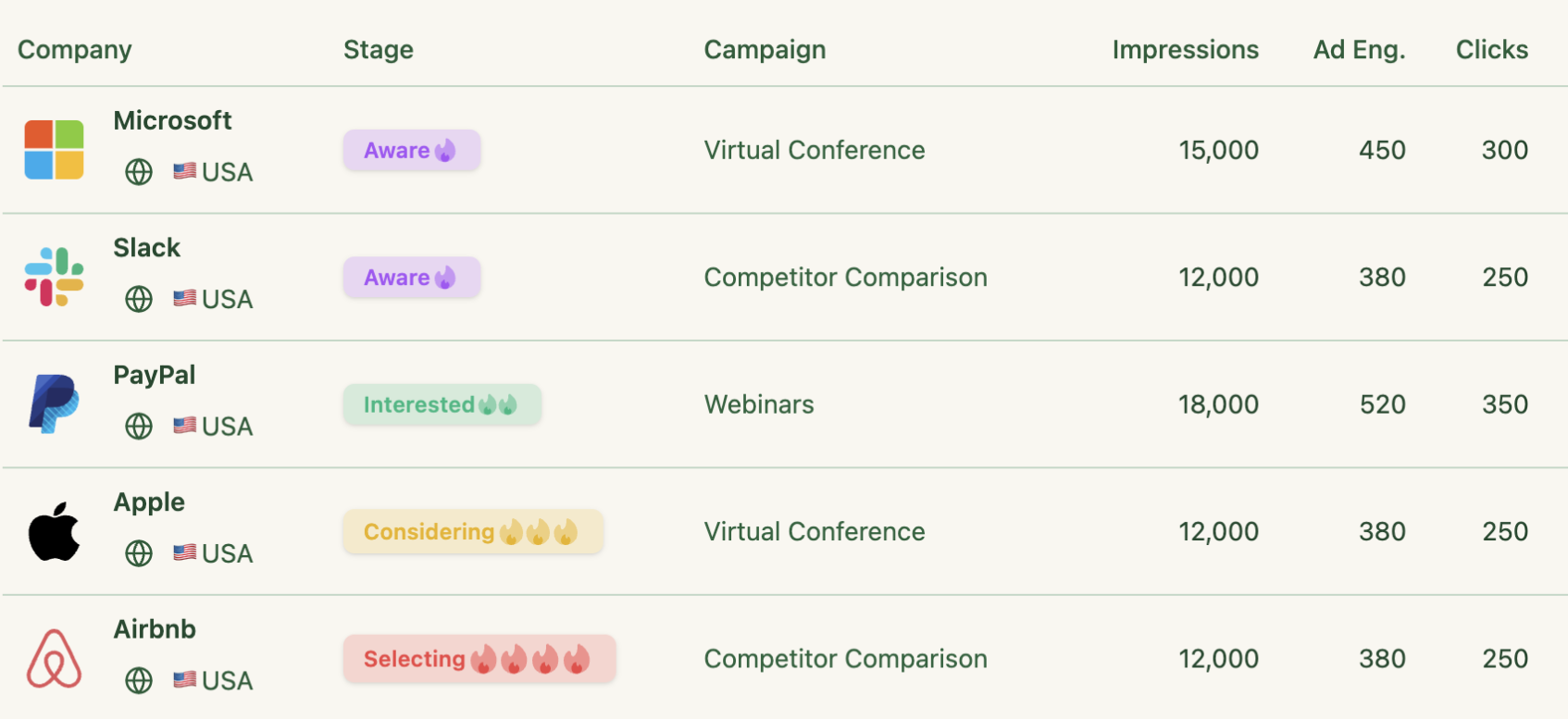
It breaks down which companies saw each LinkedIn campaign (datapulled staright from LinkedIn’s official Ads API):


It is important to note that paid ads alone can work, but combining organic efforts can help scale results much faster!
For each target account:
These organic efforts increase overall awareness.
The net penetration is higher when the same account sees your story through multiple channels: ads plus employee posts or group discussions.
From your paid campaign data, regularly check reach and frequency metrics.
Aim to reach as much of the target account list as possible.
Experts recommend targets like 70–80% reach of your list with ~10 frequency (though exact numbers vary by list size and campaign length).
Use LinkedIn’s Audience Penetration metric to monitor this directly.

If penetration is lagging, do one of two things: increase the budget or shrink the audience.
A smaller, more relevant list will be easier to saturate.
Also, balance spending between top-of-funnel (new accounts) and remarketing (engaged accounts).
As experts say, don’t “starve your remarketing.”
Keep 20–30% budget for audiences who have already visited your site or engaged.
Always ensure your ads appear frequently enough in each account’s feed (but not so much that you annoy them).
In practice, check that the average frequency isn’t too high for low penetration.
If only a handful see ads 20+ times, but most see nothing, you’re wasting budget.
High frequency and high penetration mean you’re capturing the whole account audience, so it’s time to broaden or upgrade creatives.
Use an ABM funnel approach on LinkedIn.
Start campaigns to warm up accounts with thought leadership or pain-point content (e.g. whitepapers or industry stats).
Once you achieve high penetration in that stage (or have captured engagement tags in your CRM), retarget those same accounts with deeper content: demos, case studies, or webinars.
This “warm-up then wake-up” strategy helps ladder accounts through ABM stages like awareness → interest → consideration.
ZenABM can help you make this tracking easier.
It assigns a historic and current engagement score to each account based on LinkedIn ad engagements, so you’ll know which accounts have been exposed to your ads quite a lot, and also which ones are ‘hot’ at the moment.
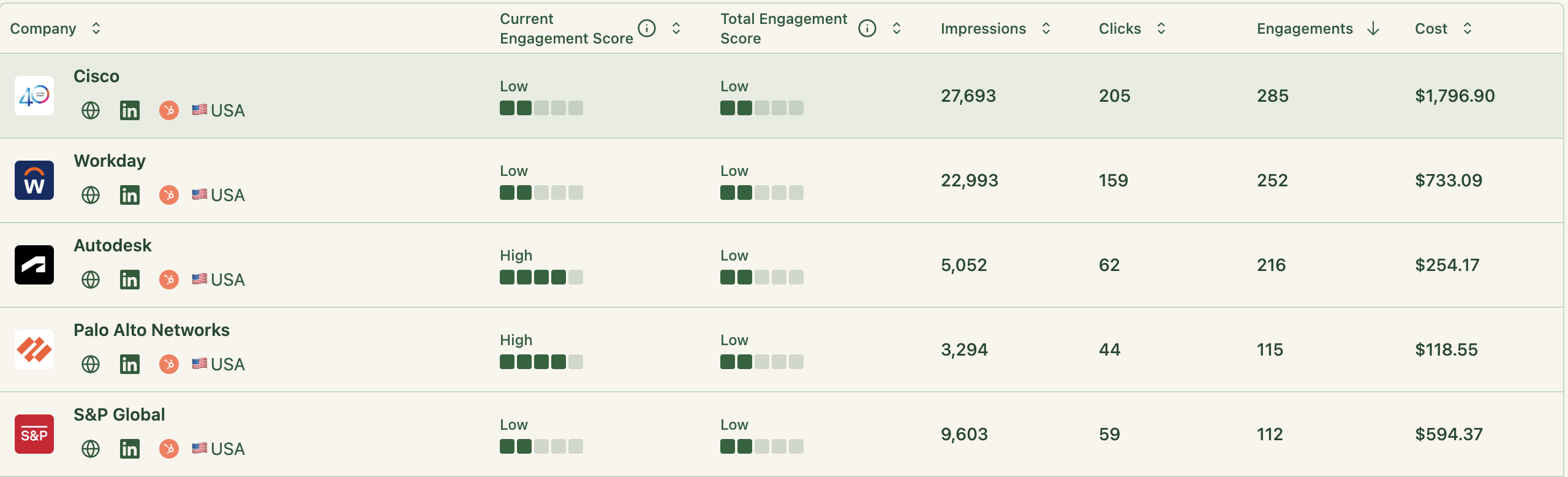
Then, ZenABM also assigns all accounts an ABM stage based on the engagement score and data from your CRM, and the thresholds for each stage are customizable at your end:

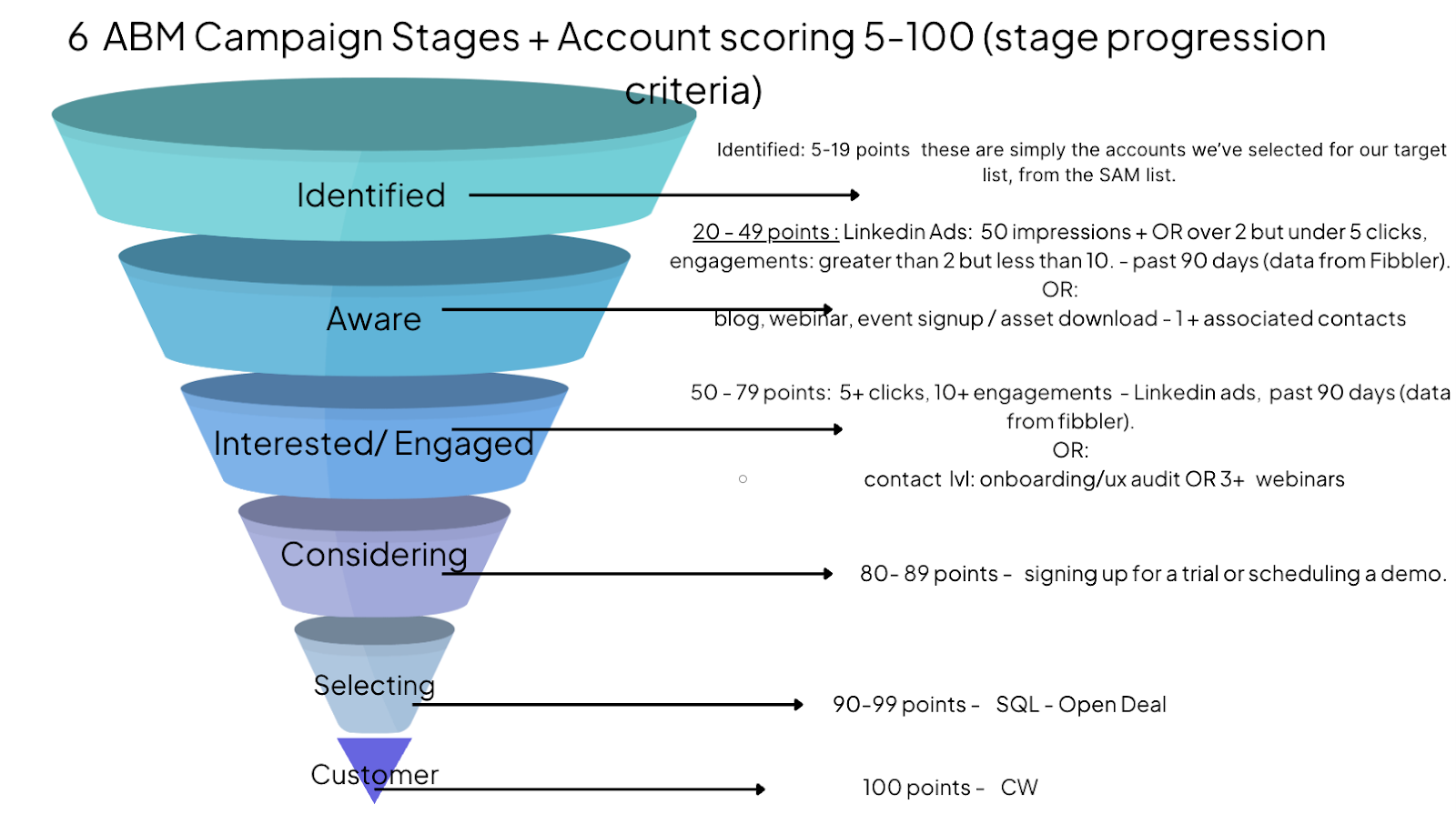
Pro Tip: If you’re confused about how you should go about defining your ABM stages, you can take inspiration from Kyle Poyar’s ABX model:

Our customer Userpilot used this model to design their ABM stages framework.
Here’s what it looked like:
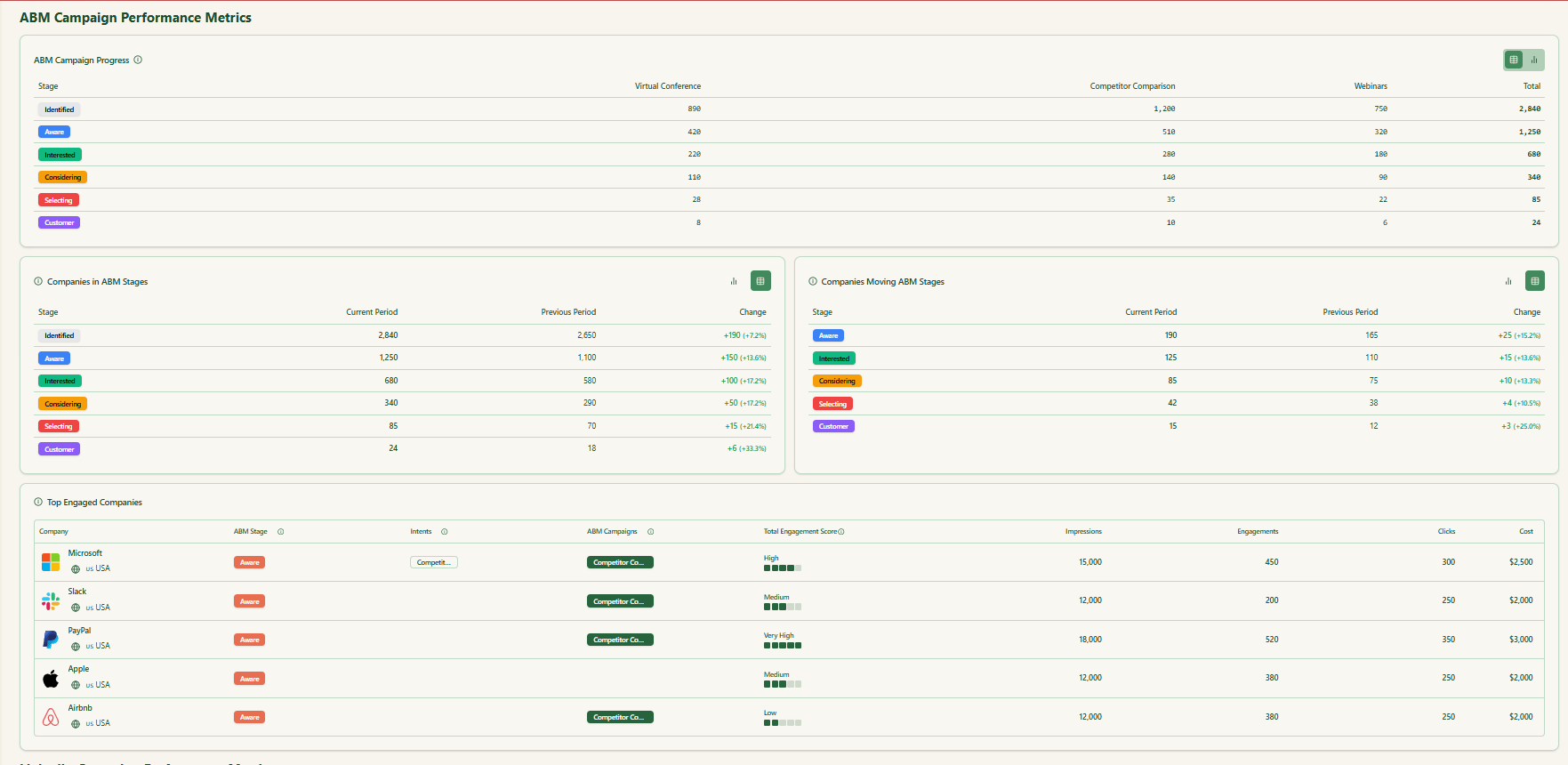
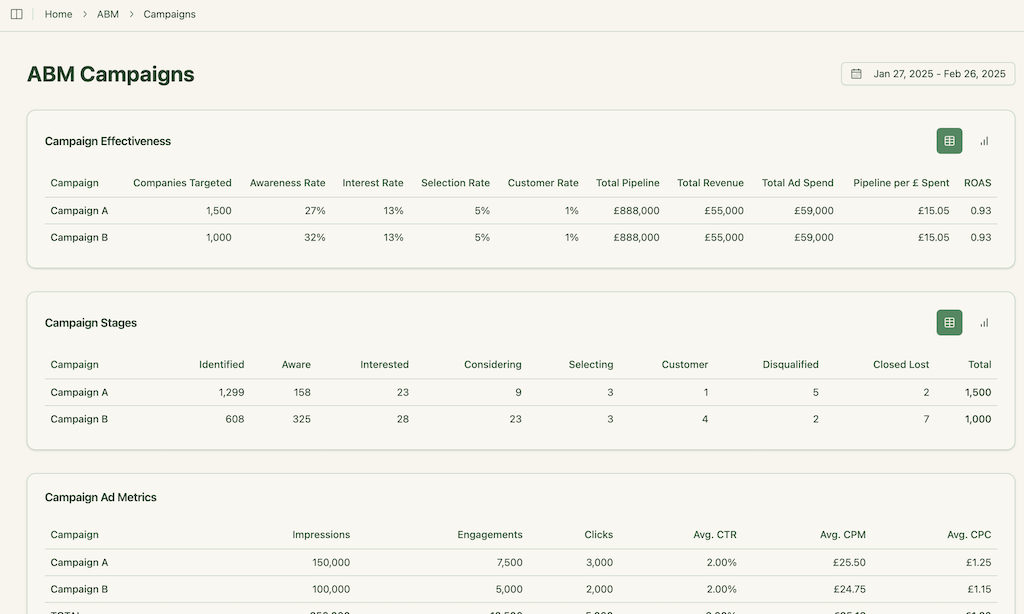
Measure your account penetration as a KPI.
Track these three key rates:
Use company-level dashboards (like in ZenABM) to see these stats in real time:

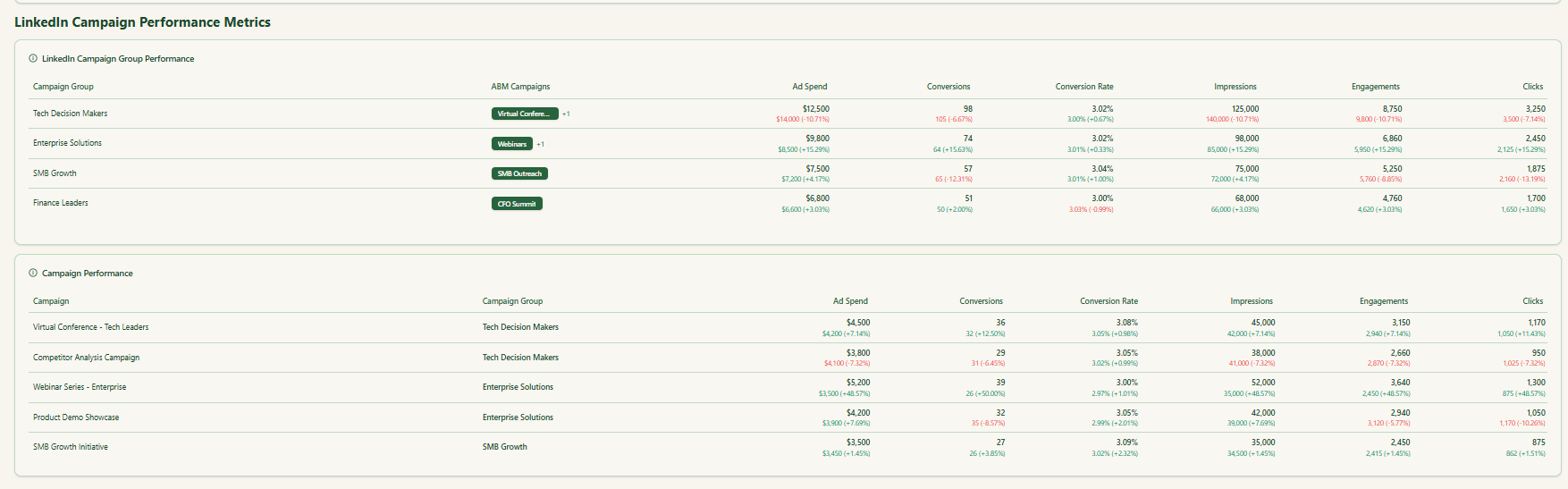
If you spot “dark accounts” (target accounts with no engagement), assign them to personalized outreach or exclude them from inefficient spend.
Penetration data should feed into weekly ABM standups: decide which accounts to double-down on, which new segments to add, and what creative pivot is needed.
Leverage LinkedIn’s ad formats and features to boost penetration:
ZenABM’s platform can enhance all of the above by providing account-level visibility and automation.
Its ready-made dashboards pull in LinkedIn Ad data for each target company and campaign in real time.
For example, ZenABM automatically calculates account scores and ABM-stage segmentation as soon as you link your LinkedIn ad account and CRM.
This means you immediately see which campaigns hit which companies – no manual CSV wrangling.
Also, ZenABM’s campaign analytics dashboards show exact reach and engagement per account.
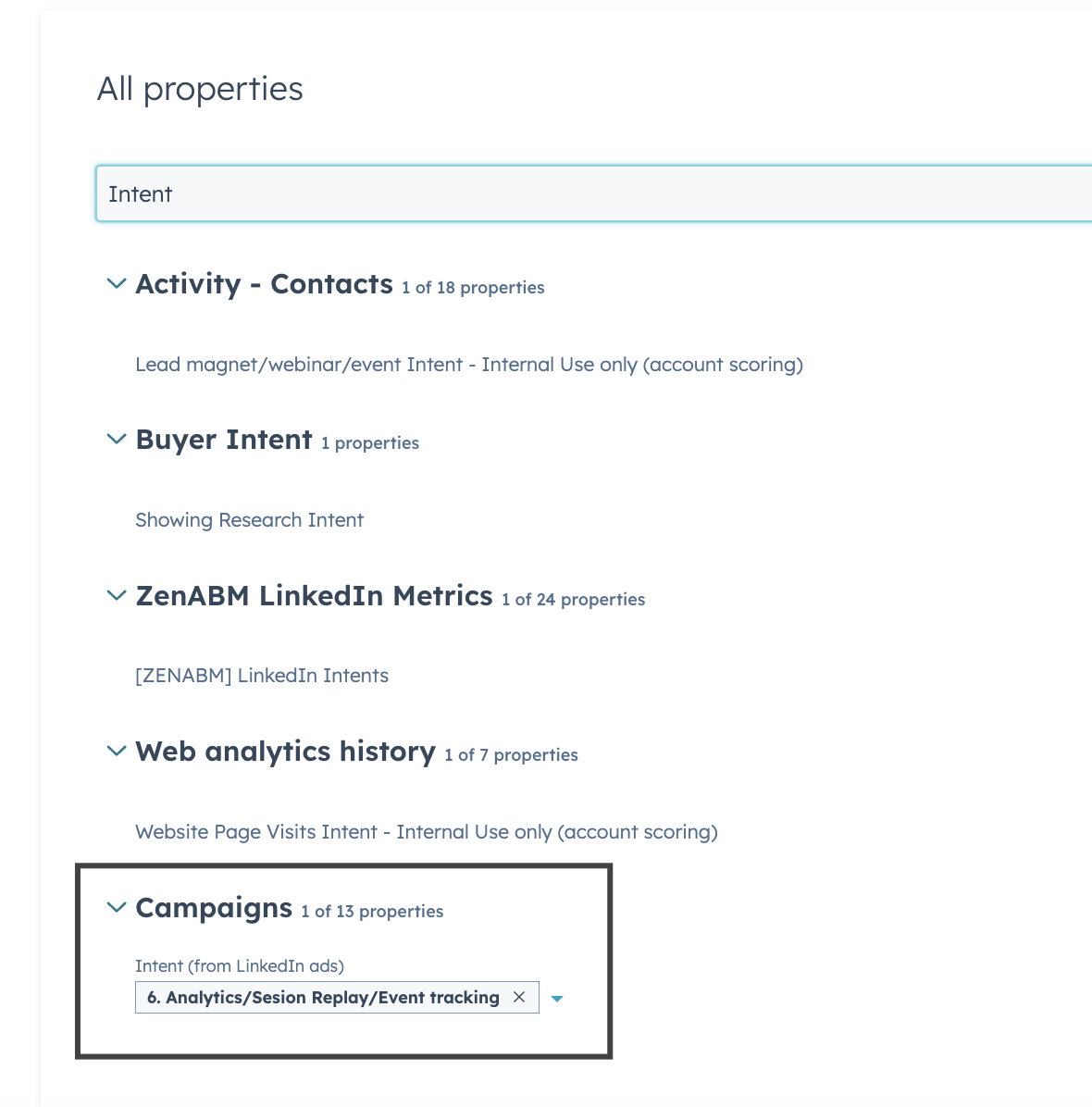
Its intent signals module uses LinkedIn engagement data to guess purchase readiness per account, pushing that into HubSpot/Salesforce so BDRs know which accounts are “hot.”
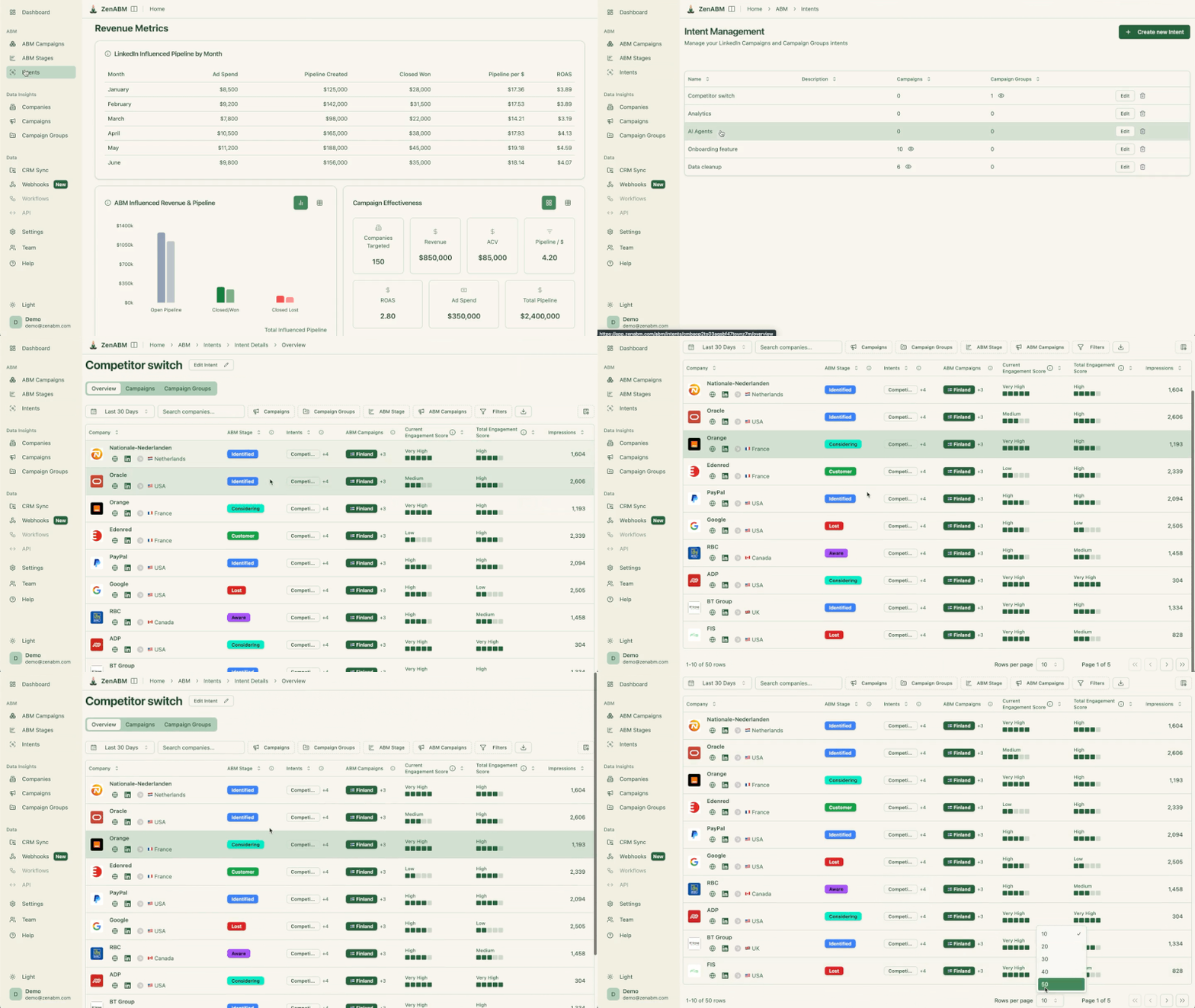

ZenABM also provides pipeline attribution: it matches accounts in LinkedIn campaigns to closed deals, telling you how much pipeline each campaign (and channel) actually drove.
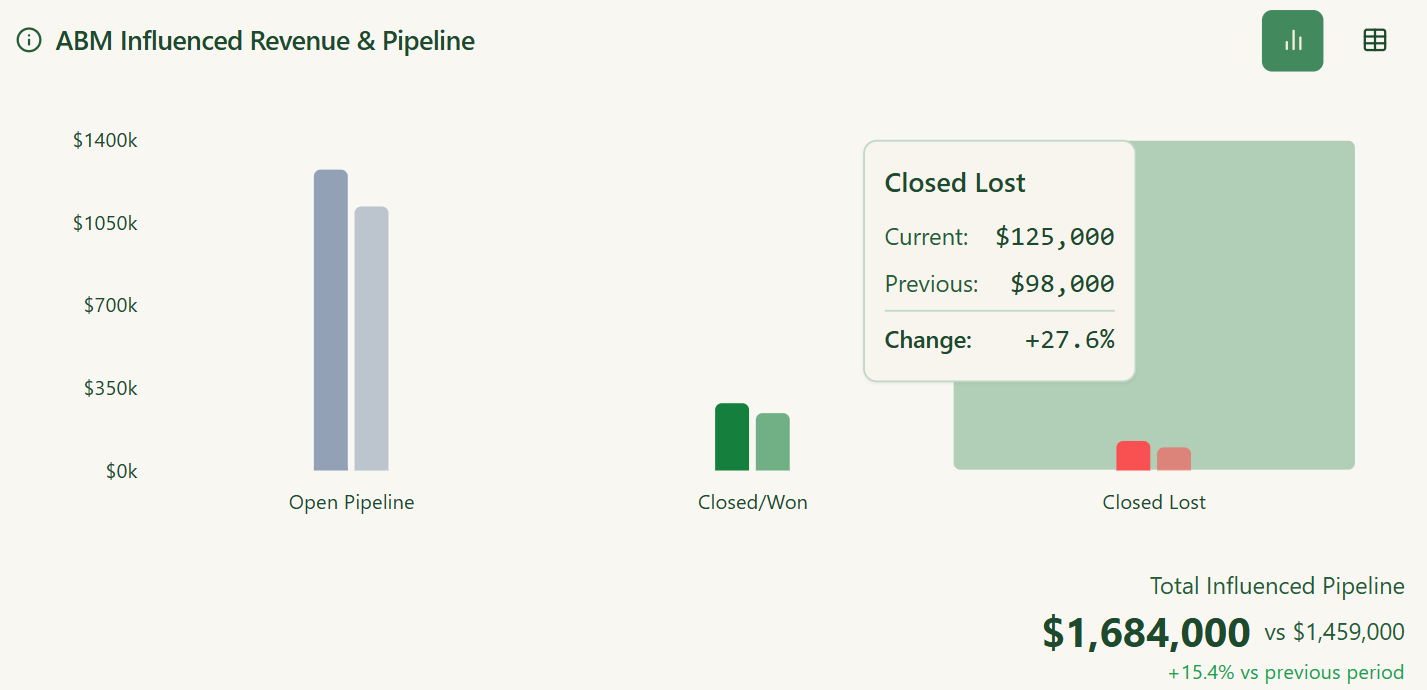
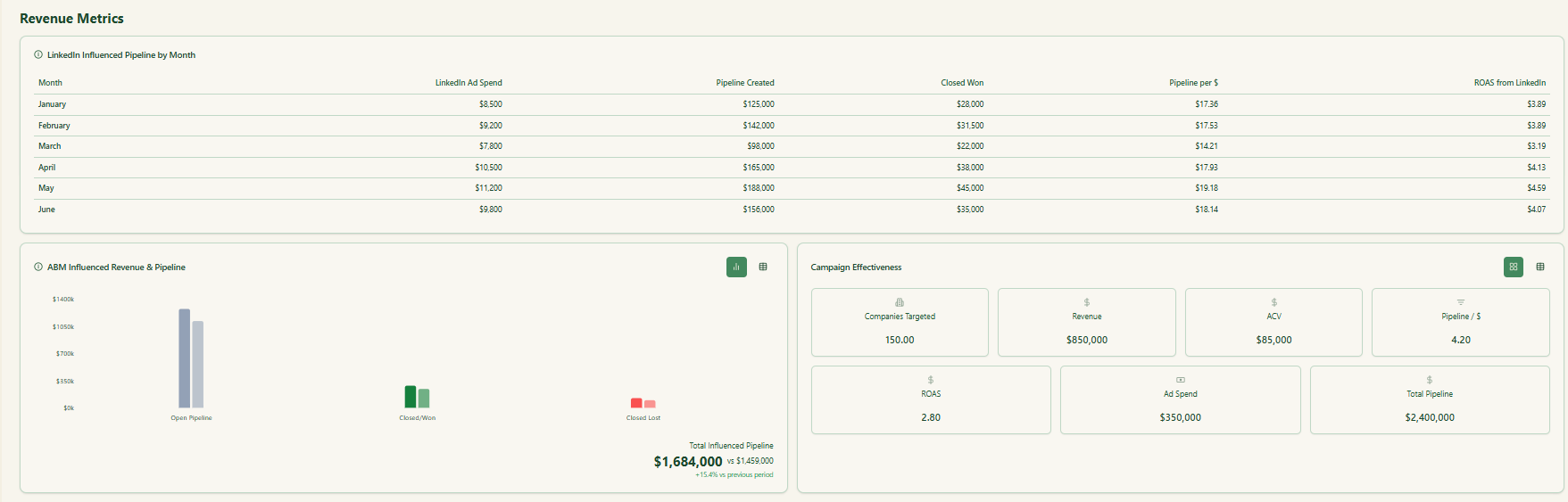
In short, it ties your penetration metrics directly to revenue outcomes.
If you connect your ad campaigns, you can hand off queues of Marketing-Qualified Accounts (MQAs) to sales with full context – who clicked which ad, which content, and from which company.
This closes the loop on penetration: you not only know how many accounts you reached, but who in those accounts engaged, and how to follow up.
Audience penetration on LinkedIn isn’t a vanity metric.
It’s the heartbeat of any LinkedIn ABM strategy.
Reaching your full target list is meaningless if the right people inside those companies never see your message. The goal is precision: engage the right accounts, the right roles, and do it often enough to build familiarity and intent.
By combining thoughtful targeting, creative alignment, and coordinated sales-marketing follow-up, you turn impressions into influence. The more consistent and multi-threaded your exposure, the deeper your presence within each account’s buying committee.
Tools like ZenABM take this a step further, surfacing exactly which companies (and how many stakeholders) are engaging with each ad.
That visibility transforms campaigns from blind outreach into data-driven relationship building.
Give ZenABM a shot for free now or book a demo with us to know more.